Renewing a policy
Last updated: July 27, 2026
Overview
Renewing a policy extends coverage into a new term and maintains continuous protection for the insured. Renewals also provide an opportunity to review coverage, update client information, and confirm all details carry forward accurately. When you renew a policy, amplo automatically:
Creates a new policy record with new Effective and Expiration Dates.
Links corresponding LOB records to the renewed policy.
Copies associated Coverages and Schedules to ensure continuity and accuracy.
This article explains the renewal record types in amplo and how to manually renew a policy.
Record mapping logic
Monoline policies
When a monoline policy is renewed, the Status and Business Type defaults to Renewal. Record Types are automatically mapped to their renewal-specific versions. The table below outlines the relationship between system record types, policy type, and status.
Benefits | Commercial Lines | Personal Lines | |
Prospective Policies | Prospective Benefits | Prospective CL | Prospective PL |
Renewed or Rewritten Policies | Remarket Benefits | Remarket CL | Remarket PL |
Written Policies | Written Benefits | Written CL | Written PL |
Package policies
When a package policy is renewed, the child LOB record types mirror the policy’s record type. The table below shows the relationship between system LOB record types, policy type, and policy status.
Commercial Lines | Personal Lines | |
Prospective Policies | Prospective CL LOB | Prospective PL LOB |
Renewed or Rewritten Policies | Remarket CL LOB | Remarket PL LOB |
Written Policies | Written CL LOB | Written PL LOB |
Renew a policy
On the policy record, click Renew. You'll be redirected to the renewal policy record.

Review and update the following details as needed:
Effective and Expiration Dates: Recalculated using the prior term dates and policy length.
Schedules, Hazards and Coverages: Schedules from the original policy may not appear immediately on the renewal due to system customizations or job queue processing. Do not manually clone schedules during this time, as this may create duplicate records once processing completes.
Note: Users on versions prior to 2.7 may experience issues with premises not carrying over. This is resolved in versions 2.7 and later. If you're on an earlier version and run into this issue, contact support@amplo.com.
c. Child Lines of Business (if applicable).
d. Initial Premium: Confirm the amount matches.
e. Agency Commission Percentage: Commission amounts and default carrier commission rules roll up to the parent of a package.
Click Written (Sold) on the sales path, then click Mark as Current Status.

For agency-billed policies, click Insert Billing to create an invoice for the renewed policy.
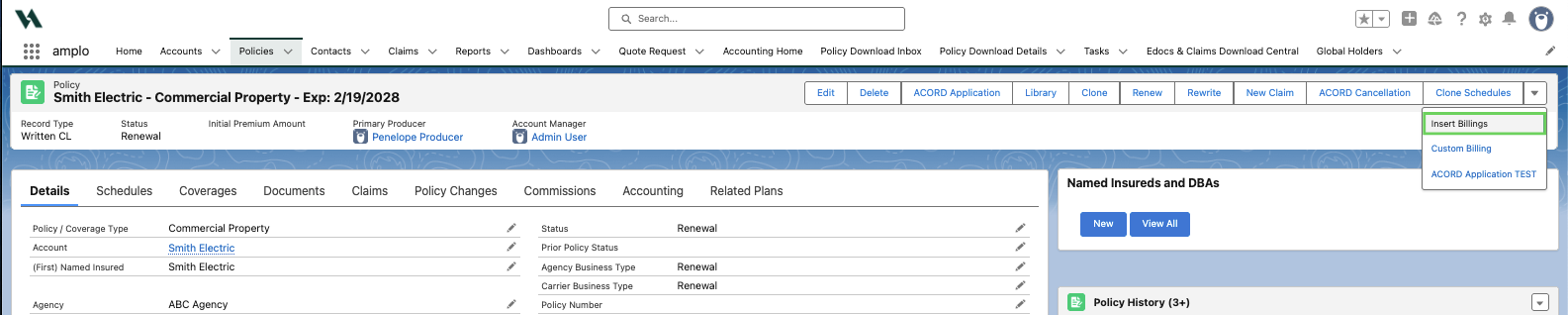
Note: For carrier-billed policies, the carrier bills the insured directly.
Copy custom fields to the renewal policy record
If custom fields are added on the Policy object, confirm the system copies the values by:
Go to Setup.
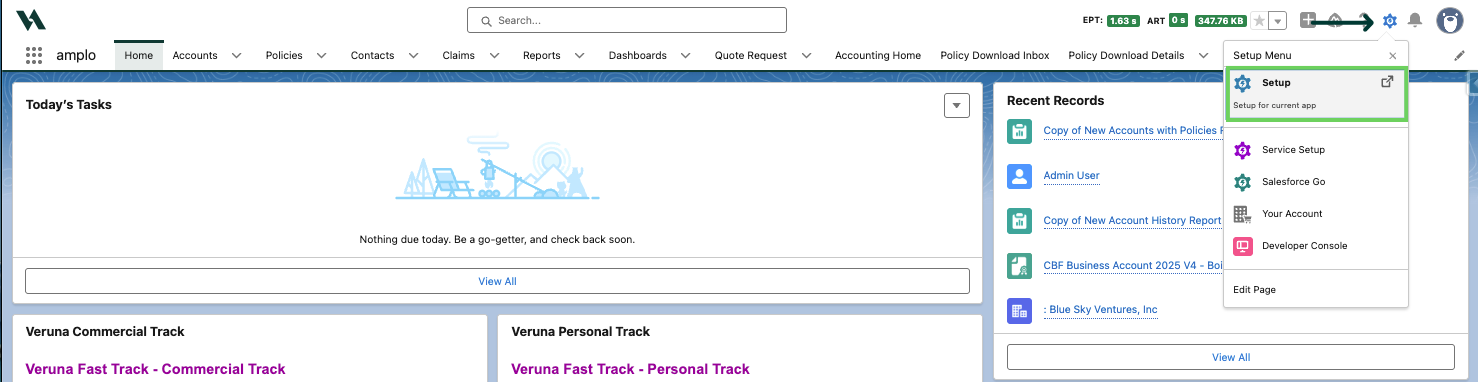
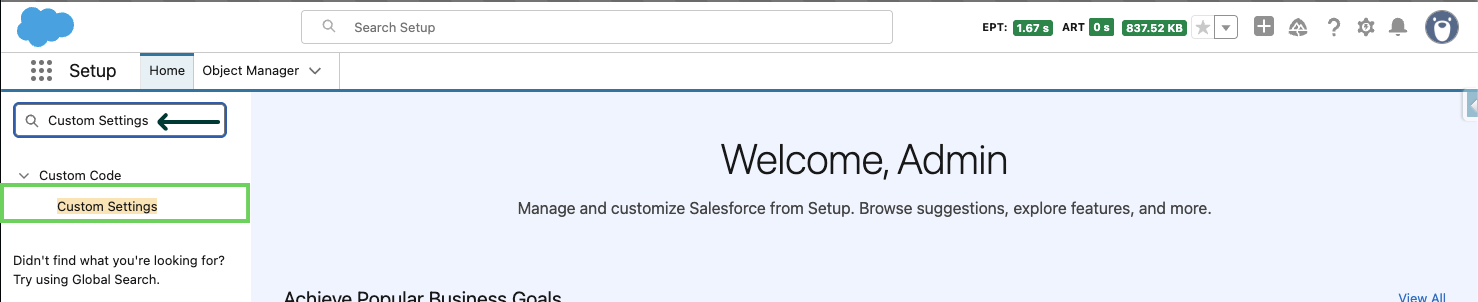
In QuickFind, search and select Custom Settings.
Locate Veruna Support and click Manage.

Find the Copy Custom Fields At Renewal setting and confirm it's enabled.

Troubleshooting
If an error occurs during renewal, amplo rolls back any completed changes. For example, if an Apex limit error occurs mid-process, created records (such as the new policy or LOBs) are discarded. Common troubleshooting steps for possible errors include:
Confirm all required fields are completed on the original policy
Verify renewal record types are configured correctly
Ensure users have the required permissions for renewal-related objects