Journal entry cloning delayed or fails
Last updated: September 1, 2026
Overview
When you clone a Journal Entry (JE), you may see a significant delay before the cloned record appears, or the process may seem to complete without producing a result.

This is commonly caused by the Large Data Optimizer (LDO) feature being enabled for Journal Entries. LDO is designed for processing thousands of records asynchronously, and when enabled, it can make JE cloning appear stuck or unresponsive.
This article explains how to identify and resolve the issue.
Understanding the Large Data Optimizer (LDO)
The Large Data Optimizer is an Accounting Seed feature built for organizations that process very high volumes of records. When LDO is enabled for Journal Entries, cloning happens asynchronously in the background rather than immediately. If your organization doesn't regularly process thousands of Journal Entry records, having LDO enabled can cause unnecessary delays and make the clone operation look like it failed.
Disable LDO for Journal Entries
If you're experiencing slow or seemingly failed JE cloning and your organization doesn't process extremely high volumes of records, disabling the Large Data Optimizer for Journal Entries should resolve the issue.
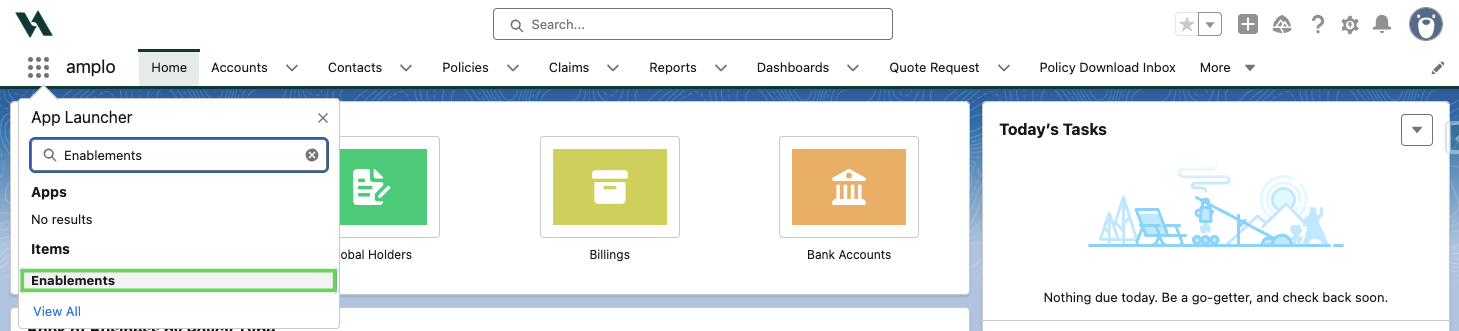
In the App Launcher, search and select Enablements.
Click the pencil icon to edit.

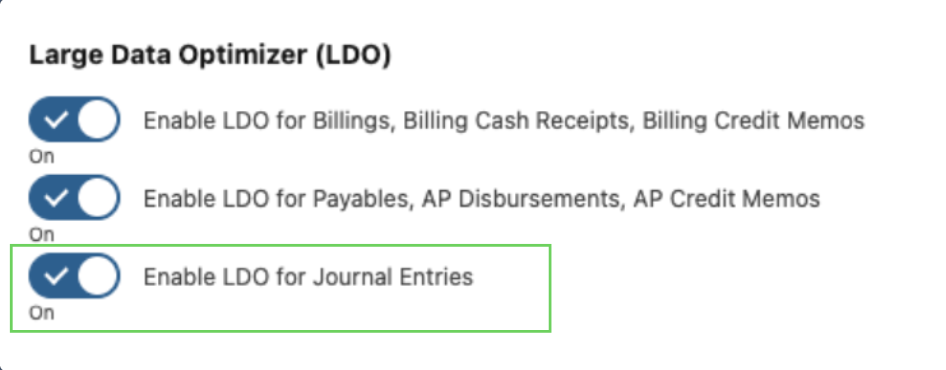
Scroll to the Large Data Optimizer section.
Toggle off Enable LDO for Journal Entries.
Click Save.
Once LDO is disabled, Journal Entry cloning should complete promptly. If you continue to experience issues after following these steps, please contact Amplo Support for further assistance.