Incorrect certificate holders when exporting
Last updated: July 28, 2026
Overview
When you click Export Holders from a certificate's Holders tab, the system opens a shared report called Cert Holders for Export. If this report has been accidentally saved with a filter applied, such as a specific certificate or client, the export may show incorrect holders rather than the ones associated with the certificate you're viewing. Use this article to identify and resolve the issue.

Note: The Cert Holders for Export report is shared across your entire organization. Avoid saving it with custom filters as this affects exports for all certificates in your organization.
Resolving Incorrect Holders
To reset the report filters, follow the steps below:
Go to the Reports tab.
Change the view on the left side of the screen to All Reports.
Search for and select Cert Holders for Export.
Click on the Filter icon and review the applied filters:
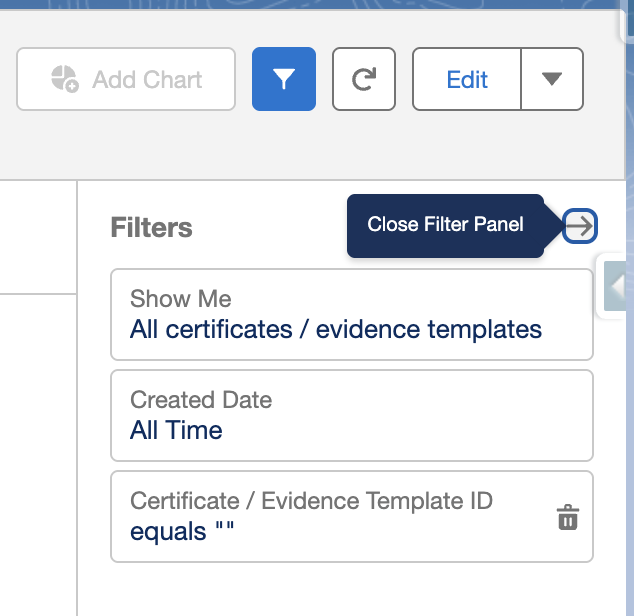
If the Certificate/Evidence Template ID has a value:
Click Edit.
Open the Filters tab.
Click into the Certificate/Evidence Template ID filter and delete the value.
Click Save & Run.
Note: If the export still shows incorrect holders after following these steps or the report filter appears correct and the export is still wrong, contact support@amplo.com.