Common S-Docs errors
Last updated: January 8, 2026
Overview
This document is a compilation of the common S-Docs errors in the amplo system and their resolutions.
Error: MS Word - Unreadable content error
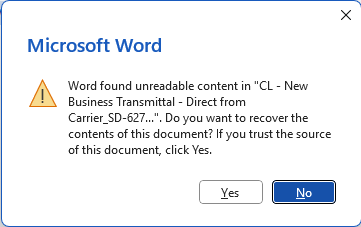
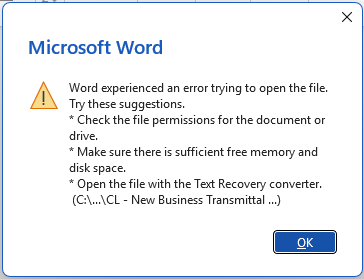
To generate either a docx or pdf document using S-Docs, you need to have a template uploaded into the system with the applicable file type. If the template file is missing or corrupt, you may encounter errors from Microsoft Word upon generation of the document. For docx, these errors include:
Word found unreadable content in [template name]. Do you want to recover the contents of this document?
Word experienced an error trying to open the file. Try these suggestions...
How to resolve
To resolve these errors, upload a new docx template file using the following instructions:
Use App Launcher to search for the S-Docs app.
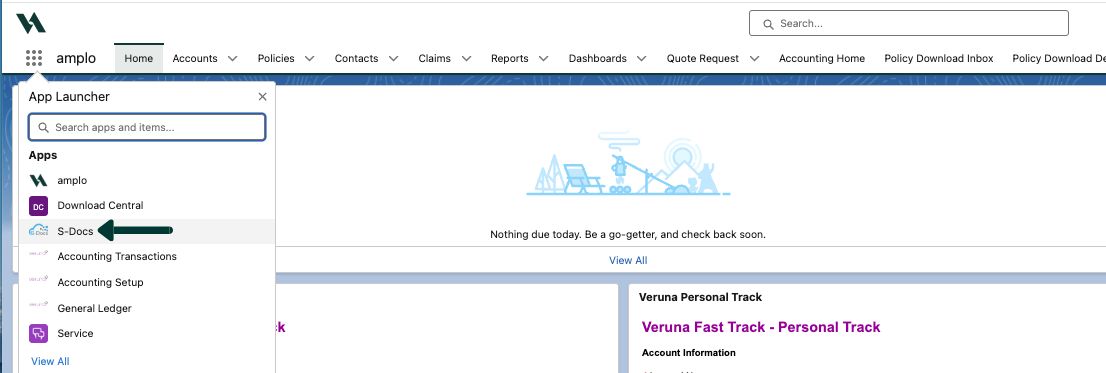
In S-Docs, select the S-Docs Templates tab.
Search and select each template causing the issue.

Select the drop down arrow in the button tool bar, and select Template Editor.
Under the Upload New DOCX Template tab, select Choose File and upload the appropriate file for the template selected.
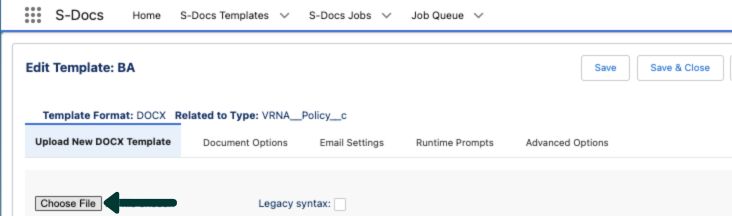
Once the upload is successful, select the Save & Close button.
Repeat steps 3-6 for each of the affected templates.
For more information, review DOCX and PDF-Upload articles.