Policy rewrite and reissue logic
Last updated: March 4, 2026
Overview
When a rewrite or reissue download transaction occurs, it can affect cancelled policies in two different ways:
Create a new policy record
Update an existing cancelled policy
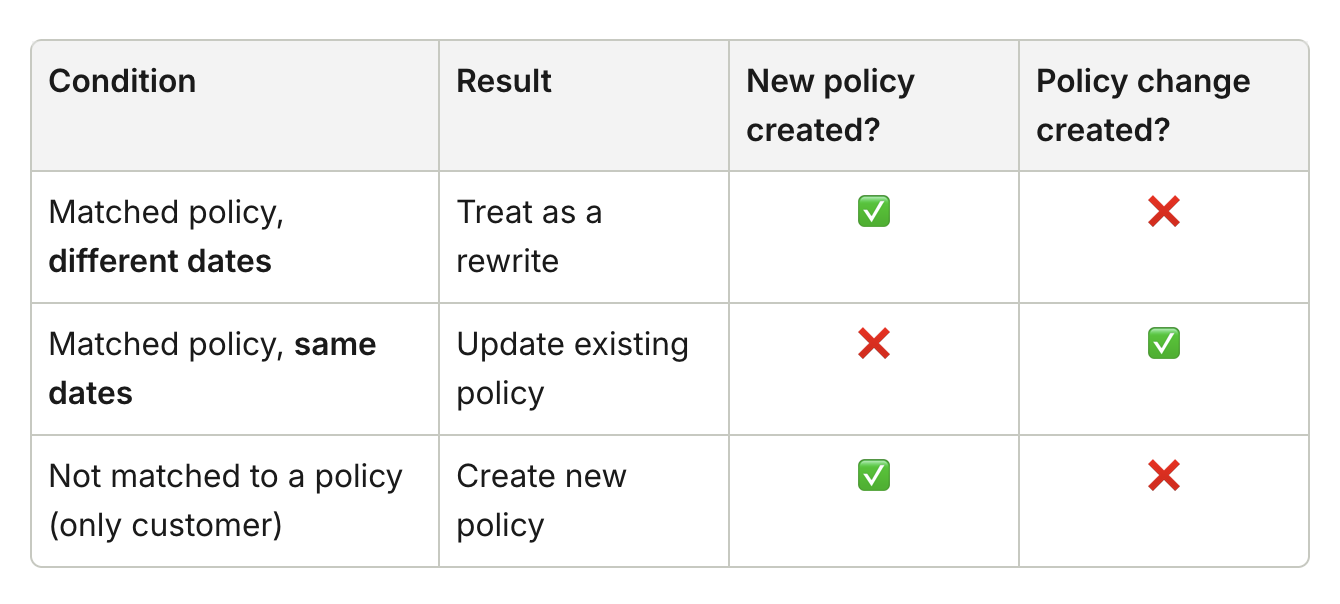
The system determines which action to take based on whether the Effective Date and Expiration Date match the cancelled policy. This article outlines what happens in the system for each scenario.
Rule logic
New policy record creation
This scenario occurs when the download’s Effective Date and Expiration Date do not match the cancelled policy. In this case, the system treats the download as a new policy start. When this happens:
A new Rewritten policy record is created.
Data from the cancelled policy is copied into the new policy.
The Prior Expired Policy field references the cancelled policy.
The Superseded By field on the cancelled policy is updated to point to the new policy.
If the download matches only a customer account, but not a specific policy:
A new Rewritten policy is still created.
No Policy Change record is created.
The Initial Premium Amount is taken directly from the download rather than existing policy data.
Update to an existing cancelled policy
This scenario occurs when the download’s Effective Date and Expiration Date match a cancelled policy. In this case, the system treats the download as a correction or recovery of the cancelled policy. When this happens:
The cancelled policy status is updated to Rewritten.
A Policy Change record is created to ensure premium calculations remain accurate.