"Required Field Missing" error when inverting to payable
Last updated: April 20, 2026
Overview
When inverting a credit memo billing to a payable, you may encounter the following error: REQUIRED_FIELD_MISSING, Required fields are missing: [Payable]:[Payable].
![REQUIRED_FIELD_MISSING, Required fields are missing: [Payable]:[Payable]](https://assets.usepylon.com/37d7ca7c-70df-45a3-a0cb-4ce522ef64f1%2F1776261232811-image.png?Expires=253370764800&Signature=Z7A91X5~yXs2sNpKVFRWTxNwpyrQRHv~MhTBkF~CMeQuKmmDrNY1oJiKdmI85mZItr1YatHy5RC92Xl~BeASen6qXUsb3Q~31ZhBib32sCv3jjuXtXX87pj0UKzVIaD8vjzrWRmIv21tJGypgbLh8cZvdBs7mlMj48I0bbf2Gj-NYkqSRM96Tjw9EXuzr9xMk0OYbXPY0QdgkzCGM5k1eAtOkfD5dZnj~Fwh0rUmdsNiCQWp2cPtirPNg01CwAzrIlNn5Z384skbrbOhdTjcfYMjFu3H-ErwjF-HO3wLQYJt10iA5YgxnDel63P4~ZyUH7PCbPAi1k830wauf70c3w__&Key-Pair-Id=K3NV4LZ47N8M46 "image.png")
This prevents the inversion from completing. This article explains what causes this error and how to resolve it so you can successfully invert the credit memo to a payable.
How inverting to a payable works
When you click Invert to Payables, the system creates three new records in sequence:
A new Billing record.
A new Payable record, linked to that billing.
A new Payable Line record, linked to that payable.
Each record depends on the one before it. If any step fails, the records that follow it will be incomplete.
Why the error occurs
The payable record fails to create when a validation rule on the payable is triggered. When that happens, the payable line has nothing to link to, and the payable field appears blank. For example, when the Due Date is set to an earlier date than the Billing Date, the system can't save the payable, and the process fails.
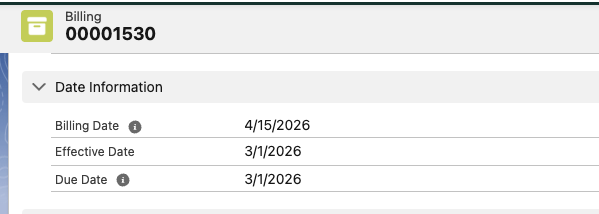
When this occurs, the payable record is not created. Without a payable record, the payable line has nothing to link to, which is why the payable field appears blank.
How to resolve the error
The resolution depends on which validation rule is triggered. For the due date scenario covered in this article, update the due date so it matches or falls after the billing date on the affected credit memo.
Update the due date
Find the credit memo record that is failing to invert.
Scroll down to the Date Information section and verfify the Due Date with the Billing Date.

Use the edit pencil to update the Due Date to be equal to or later than the Billing Date.

Save the record.
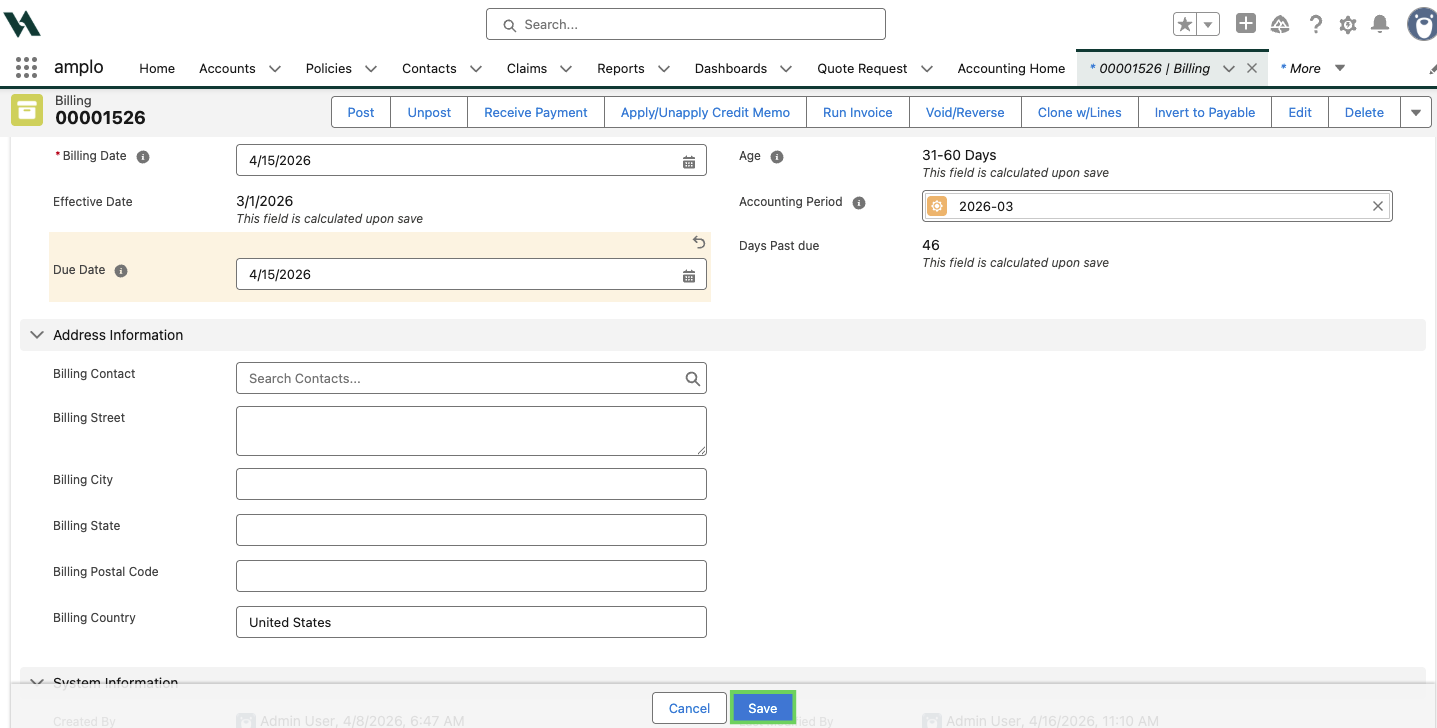
Click Invert to Payable again.

Preventing the error
As you enter billing information, make sure the data is accurate so the payable record creates without triggering a validation rule.